


RP Text to Speech is a Vintage Story mod by YangWenLi. RP Text to Speech reads Vintage Story chat aloud with customizable voices, pitch, performance options, and 3D local positioning.
Why this mod is worth installing
It is useful for roleplay players who lack a microphone, prefer listening to chat, or want clearer local communication on multiplayer servers.
What RP Text to Speech adds
RP Text to Speech converts messages from the in-game text chat into spoken audio on the client. It is designed for multiplayer roleplay: nearby players can hear speech as if it came from the character who sent the message, while volume changes with distance.
Several voice options and pitch controls let players create a distinct sound for their character. The result can help people participate in voice-oriented roleplay communities even when they do not use a microphone or prefer not to speak aloud.
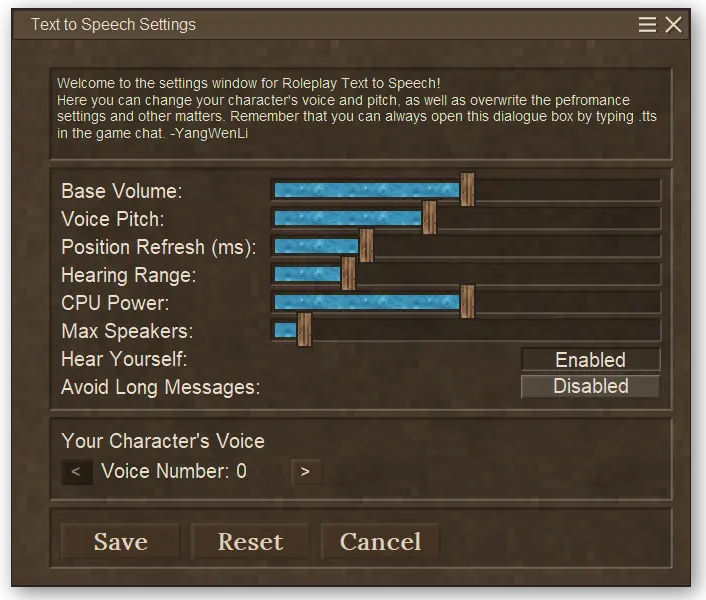
The mod includes performance controls, including the ability to choose how much CPU capacity speech synthesis may use. Server-side overhead is kept low because speech is generated on clients when text is requested.
A chat command opens the settings interface: type .tts to adjust the mod. If it has been disabled, .rptts turns it back on. An API also allows chat-related mods to interact with the speech system without tightly coupling their code.
Dependencies and customization settings
The settings screen shows how extensively RP Text to Speech can be adjusted, from the character voice to the CPU resources used for speech synthesis.
Where to download RP Text to Speech
The official Vintage Story Mod DB page is the right place to get the current release through the in-game mod manager.